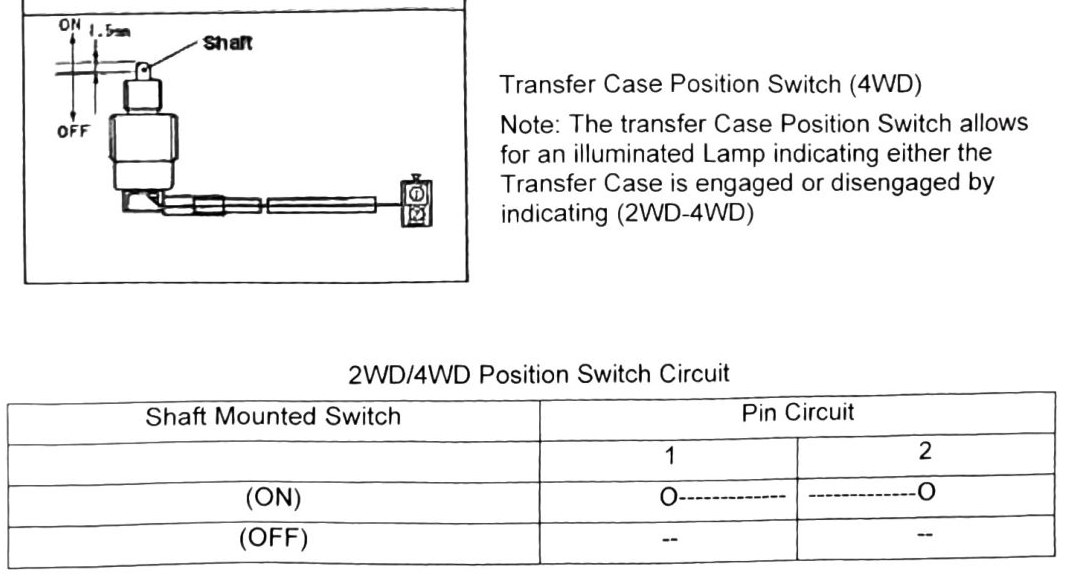
Speedometer Cable
Our truck is 4WD, so the cable takes the Transfer Case routing/connection described below (not the “2WD/Transmission” alternative also mentioned in the source).
Speedometer cable replacement
- Remove Speedometer Head Unit.
- Disconnect Cable for Transfer Case (4WD) or Transmission (2WD).
- Remove the five (5) attachment clamps.
- Pull the cable back through the Firewall Grommet. If the Grommet is damaged, replace the unit before installing a new cable.
- Install in reverse order.
Note: Cable must be installed in the original routing position. The first clamp from the Transfer Case (or Transmission) is marked in yellow marking tape.
(verify printed p.171) — a dimension near the Transfer Case shaft callout was transcribed by OCR as “ON 1.5mm / OFF”, which does not parse cleanly as a stated spec. Do not treat “1.5mm” as a confirmed clearance or engagement figure without checking the printed page.
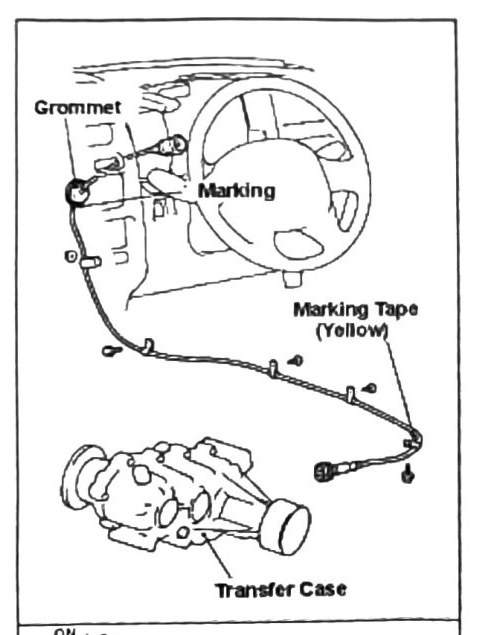
Transfer Case Position Switch (4WD)
The Transfer Case Position Switch drives an illuminated dash lamp indicating whether the transfer case is engaged or disengaged (2WD/4WD indication).
(verify printed p.171) — the “2WD/4WD Position Switch Circuit” table (shaft-mounted switch, ON/OFF states against Pin 1 / Pin 2) did not survive OCR with a reliable pin-to-state mapping. Do not guess which pin reads which state — check the printed diagram.